
How to Cut Dead Time Out of Tennis Match Videos
June 28, 2026
Record a two-hour tennis match and you’ll capture maybe twenty or thirty minutes of actual tennis. The rest is everything between points — picking up balls, walking back to the baseline, towel breaks, changeovers, the occasional chat at the net. The ball is genuinely in play for only a small fraction of a match, often well under a quarter of the total time.
That “dead time” is the most annoying thing about reviewing your own footage. If you want to study your game, build a highlight reel, or send a few rallies to your coach, you shouldn’t have to sit through two hours to find the good parts. Here’s how to cut the dead time out — first by hand, then the faster way.
Why bother cutting dead time?
- Faster review — watch only the points, not the gaps.
- Easier to share — a tight highlight reel is far more sendable than a raw two-hour file.
- Smaller files — rally-only clips take a fraction of the storage.
- Better coaching — a coach can scan rally after rally instead of scrubbing a timeline.
Option 1: Do it by hand
The baseline approach is to load the recording into a video editor — iMovie, CapCut, DaVinci Resolve, Premiere, whatever you have — and manually cut out everything that isn’t a rally.
It works, and it’s free. The catch is time: a single match can have 100–200 points, and trimming each gap by hand is slow, repetitive work. Cutting one match cleanly can easily take longer than the match itself. For a one-off highlight that’s fine; as a routine after every session, it gets old fast.
Option 2: Generic “auto” tools (and why they struggle)
Some editors have automatic features like “detect silence” or scene/motion detection, and it’s tempting to point one at a tennis video. In practice they don’t work well here:
- Silence detection keys off audio, but tennis dead time isn’t silent — there’s crowd noise, talking, and ambient sound throughout.
- Motion detection trips on anything that moves: players walking, a passerby, camera shake.
These tools weren’t built to understand a tennis match, so they tend to cut in the wrong places and still leave you with a lot of manual cleanup.
Option 3: Let AI find the rallies
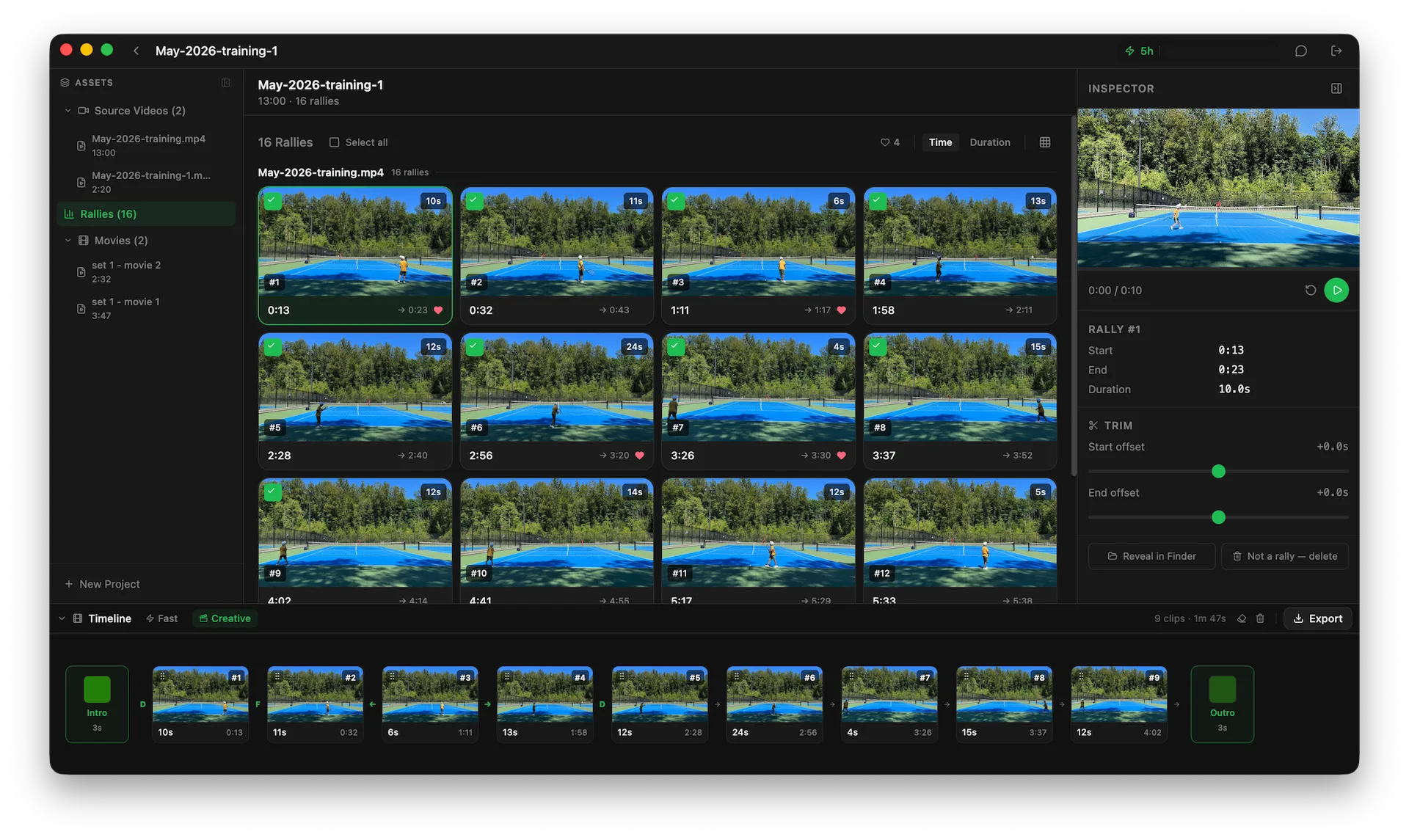
The fastest approach is a tool that actually understands tennis — one that detects where each rally starts and ends, then removes the gaps automatically. That’s what Rallytics is built to do.
Rather than tracking the court with a fixed camera angle, Rallytics uses an AI model to understand the video, so it works with footage shot from most angles — a phone on the fence, a GoPro on a tripod, handheld, even 4K. The basic flow:
- Add your recording. Point Rallytics at the match video you already have.
- Let it analyze. It detects each rally automatically and removes the dead time in between.
- Review rally by rally. You get clean, clip-by-clip rallies instead of one long file.
- Export. Keep the rally-only cut, or export just your favorite points as a highlight reel.
Because the original footage stays on your computer — only a small low-resolution preview is sent off for analysis — and everything is processed into normal local files, your match library lives on your own machine rather than in a phone’s camera roll or behind a cloud subscription.
A few tips for clean results
- Frame the whole court if you can — the AI just needs to see the points, not a perfect broadcast angle.
- Any reasonable camera works — phone, action cam, or camcorder; no special gear or particular height required.
- Longer recordings are fine — a full match or a whole practice session both work; the dead time comes out either way.
The bottom line
You can cut dead time by hand, and for the occasional clip that’s perfectly fine. But if you record regularly and just want your rallies without the slog, letting an AI detect them is dramatically faster. Rallytics is a free download for Mac and Windows, with a couple of hours of analysis included — so you can try it on one of your own matches and see how much time you get back.